Dating app overview
ProRoast: an AI assistant that helps you build a stronger profile and reply with confidence
ProRoast combines a profile review scored from 0 to 100, photo selection, bio generation, chat analysis, openers written from a match's profile, practice on AI personas, and compatibility checks. Below is a full overview of the app's features with screenshots and an explanation of what you see on each screen. You can start for free with no sign-up: the first photo score comes back in about 30 seconds.

What the app does
ProRoast works on the whole dating funnel, not just one part of your profile
Dating success depends on several steps: your first photo, your profile text, the first message, the quality of the chat, the timing of an invitation, and the sense of compatibility. ProRoast helps with each of those moments - and gives you somewhere to rehearse before a real conversation.
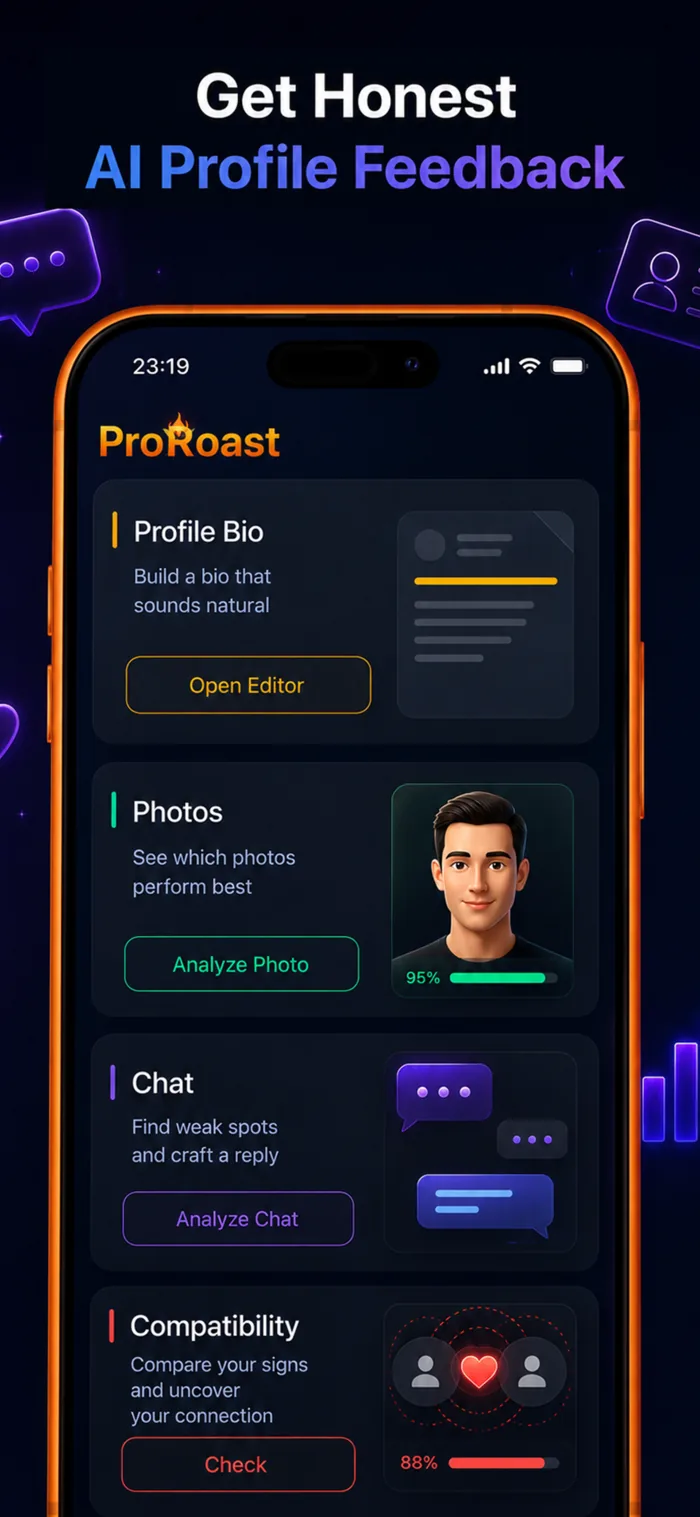
AI profile review: one control center for your dating profile
The main screen gives you a fast path into the core workflows. Instead of thinking about photos, text, and chats as separate problems, you get a clear structure: improve the profile first, then review the conversation and prepare the next step.
- The "Profile Bio" block helps you create a description that sounds alive.
- The "Photos" block shows which shots work better and why.
- The "Chat" block helps find weak spots in a conversation and prepare a reply.
- The "Compatibility" block adds an easy reason to start a conversation or compare vibes.
The full walkthrough lives on the AI profile review and dating profile generator page.
Roast score: 0-100 and a fix list ordered by impact
A profile review does not stop at general impressions. ProRoast condenses how your profile reads into a single number - a gold roast score from 0 to 100 - and explains what produced it. You see not just that something is off, but how far the profile is falling short and which fix moves the number most.
- Free to start: the first photo score comes back in about 30 seconds with no account.
- A gold 0-100 score you can come back to after each round of edits.
- A blunt, specific read: what is working and what is killing your matches.
- A fix list ordered by impact, so you know where to start.
- Face detection runs on device, and cloud analysis only kicks in after you explicitly agree.
The usual reasons behind a low score are broken down separately: why am I not getting likes.
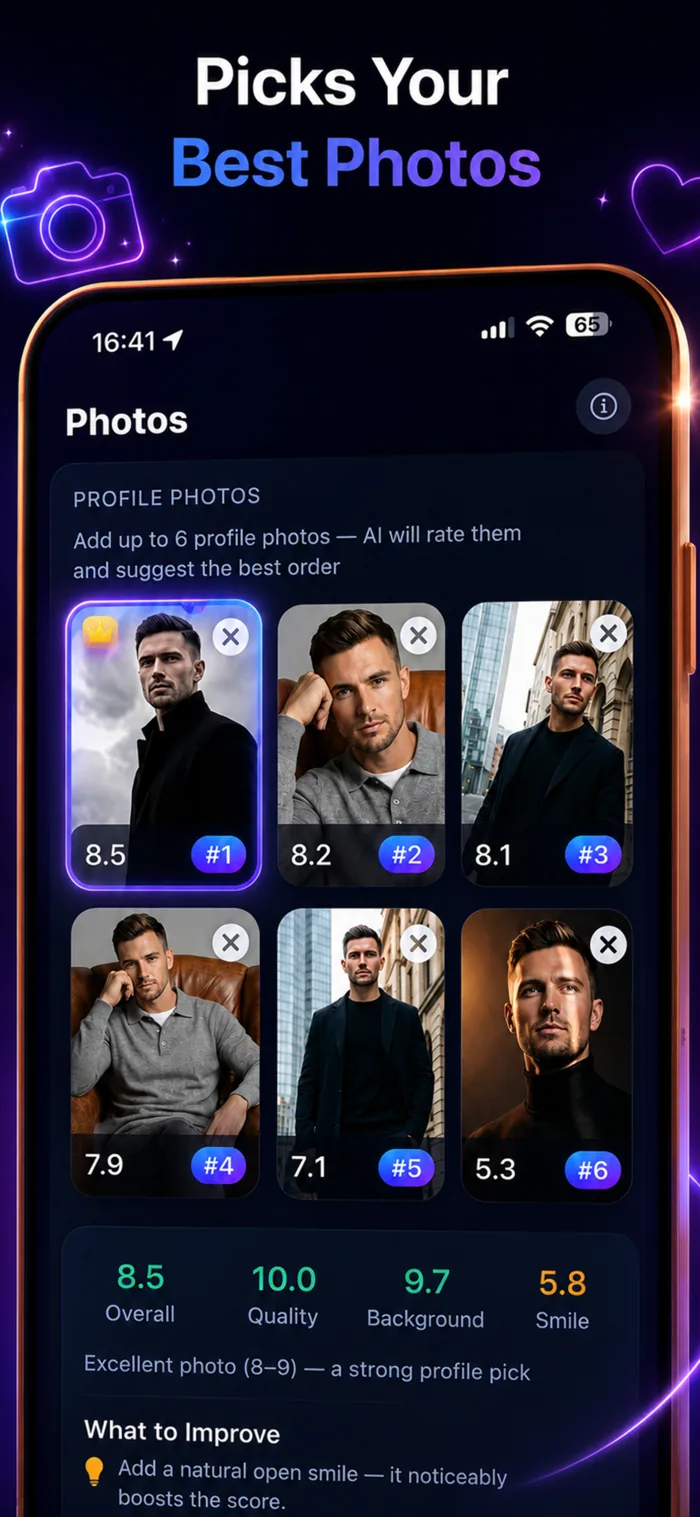
Choosing the best photos for your profile
Your first photo often decides whether someone opens your profile. ProRoast helps you choose the shot that works best in dating apps, not just the one you personally like most: a clear face, good image quality, a clean background, and a confident impression.
- Compare up to six photos on one screen.
- Rank shots from strongest to weakest.
- See scores for "Overall", "Quality", "Background", and "Smile".
- Get practical advice on what to improve in a specific photo.
How the scores work and what the AI actually looks at: Photo Analyzer.
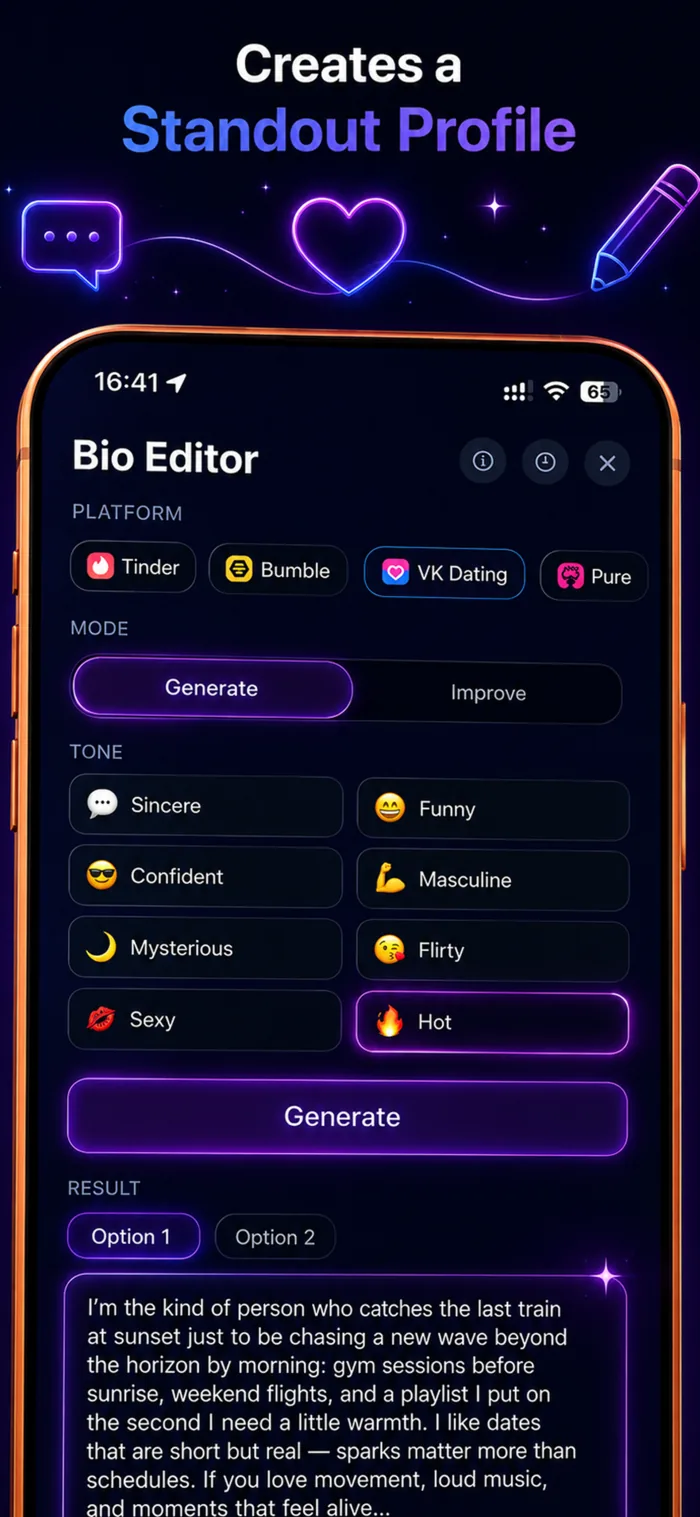
Bio editor: profile text in the right style
A good bio should not sound like a generic template. It should quickly show personality, give someone a reason to message you, and avoid overloading the profile. In ProRoast, you can create a new bio or improve text you already have.
- Choose the platform: Tinder, Bumble, VK Dating, Pure, and other services.
- Use two modes: generate a bio from scratch or improve the current version.
- Set the tone: sincere, funny, confident, flirty, mysterious, and more.
- Review several results and pick the one that feels most natural.
Examples and a tone-by-tone breakdown: Bio Editor and generator.
Openers: a first message built from their profile
The hardest part often comes before the chat starts. The profile is open, you like the person, and your head is empty. "Hey, how's it going?" feels wasted, and writing something alive is harder than it looks. Openers solve exactly that: you show the app their profile, and it finds what to grab onto.
- Up to three photos from their profile - screenshots or saved images - compressed on device.
- Profile text (bio, interests, any standout detail) is optional but makes the result sharper.
- A short profile summary: their overall vibe and what the AI could read from photos and text.
- Signals - concrete hooks like a guitar in the background, ski gear, a dog, a country from a travel shot, a line from the bio.
- Three first messages in different tones: warm, playful, and bold.
- Each opener shows the hook it was built on, so you are not copying text blindly.
- A rough sketch of how the conversation could continue, a few replies ahead.
- If the image has no profile in it, the app says so instead of inventing an analysis.
If you have already filled in your own ProRoast profile, it is taken into account, so the openers sound closer to how you actually write.
The full breakdown lives on the Opener generator page, and ready-made angles are collected in dating icebreaker questions.
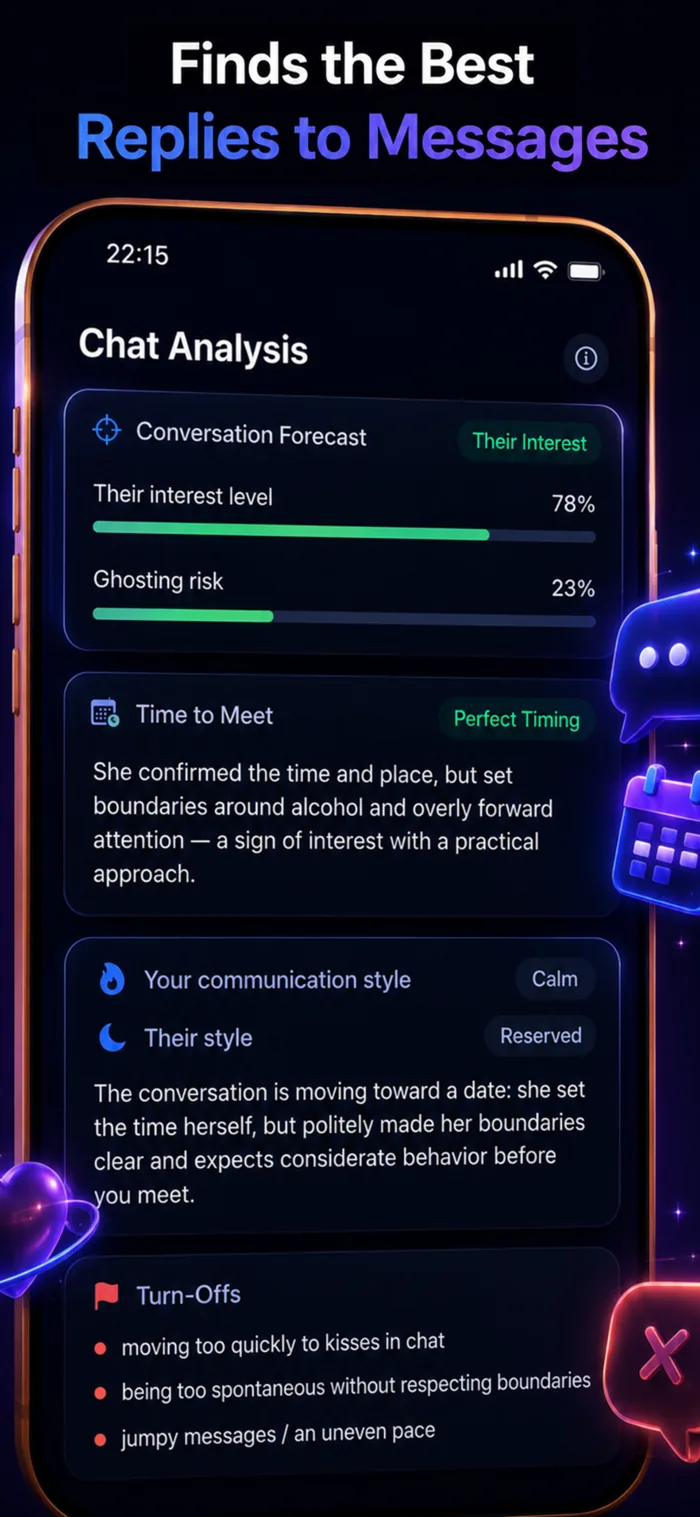
Chat analysis: understand where the conversation is going
It is easy to miss signals in a chat. Someone may be interested but cautious; or the conversation may look active while already losing momentum. Chat analysis helps you read the situation clearly and choose the next step.
- Forecast the other person's interest level.
- Estimate ghosting risk so you do not push too hard or over-message.
- Check whether now is a good moment to suggest meeting.
- Break down your style and the other person's communication style.
- Flag romance scam signals, so the usual playbook does not slip past you.
- Suggest replies that continue the conversation instead of cutting it short.
The scam check is worth calling out on its own. Romance fraud almost always follows the same script: a fast push to move off the app, an urgent money story, a refusal to video call, photos that look too polished. Those signals are easy to miss while the conversation still feels pleasant, so the analysis surfaces them explicitly.
More detail: Chat Analyzer and the guide on how to spot a dating app scammer.

Reply suggestions: fewer pauses, more natural conversation
A common chat problem is not lack of interest, but the wrong next reply. ProRoast helps you find wording that fits the context: not too dry, not too sharp, and not obviously scripted.
- Replies account for the tone of the chat and the other person's boundaries.
- Suggestions help continue the topic instead of abruptly changing direction.
- You can use the wording as a starting point and adapt it to your own voice.
- The goal is to keep a natural rhythm until it makes sense to meet.
ProRoast keyboard: replies and openers right inside the chat
Usually getting help with a message means extra steps: minimize the chat, open another app, copy the text, come back. ProRoast ships its own keyboard instead — enable it once in iPhone settings and the suggestions live in the text field of any app: Tinder, Hinge, Telegram, WhatsApp, Instagram. You switch to it with the same globe key you use for your language keyboards.
Reply generation
The first tab is "AI Replies". The flow is simple: copy their message, open the ProRoast keyboard and tap the system paste button. A moment later you get ready-made replies — tap one and it goes straight into the text field, where you can still edit it.
- The pasted message stays visible above the options, so it is always clear what each reply answers.
- Several options at once, each in a different tone, so you can match the mood of the conversation.
- "Regenerate" builds a new set from the same message; "Clear" resets the result.
- A separate button wipes the whole input field in one tap if you want to start over.
Generation settings on the keyboard itself
A small settings screen sits behind the gear icon — no need to open the app.
- Who is writing: masculine, feminine, or unspecified.
- Who you are writing to: women, men, or everyone.
- Tone: Warm, Sincere, Humorous, Confident, Playful, Masculine, Feminine, Mysterious, Flirty, Sexy, Hot. Up to three at a time — one reply option per selected tone.
- Defaults come from your profile in the app, and any override can be reset back to it.
The openers bank
The second tab is "Openers": a set of ready first messages for the moment when you have the match but not the words. It works offline, with no network at all, so it opens instantly.
- Openers are grouped by category — Playful, Bold, Funny, Compliments, Curious and Deep — from a light joke to a question that actually starts a conversation.
- The app has a dedicated Openers screen with search and category filters: like the ones you want and they show up on the keyboard right away.
- Lines you do not need can be hidden and restored later.
- Your own openers are added manually and sit next to the built-in ones under the category you pick.
- The English and Russian sets are independent — written for each language rather than translated.
- Until you build your own set, the keyboard shows a mix from different categories so you can start immediately.
Shortcuts to the rest of the app
The third tab is a set of jumps into the app: bio assistant, photo analysis, match profile breakdown, chat trainer, chat analysis, photo pose references and compatibility. One tap opens the screen you need instead of navigating from the start.
A note on privacy: the keyboard never reads the clipboard on its own — text reaches it only after you tap the system paste button, an explicit action on your side. Openers do not need full access or a network connection at all.
If you would rather build an opener around a specific profile than pick one from the bank, that is what the opener generator does, and there are more ideas for first messages in the icebreaker questions guide.
AI personas: rehearse before the real conversation
The most expensive way to learn texting is to learn it on real matches. A joke that lands wrong, a rush to meet, an awkward compliment - each costs a conversation you cannot get back. ProRoast has a mode where you can try the same things with nothing at stake.
- Nine AI personas with different personalities and messaging styles.
- Test an opener, a joke, an awkward question, or an invitation and watch the reaction.
- Mistakes cost nothing: a persona chat has no effect on your real matches.
- Practice turns the fixes from your profile review into something you have actually done.
This is not a companion bot or a substitute for talking to people. It is a training ground: see how different approaches read in live text, then carry the ones that work into a real chat.
A free browser version of the trainer runs on this site: AI girl chat - five messages, an interest score from 0 to 100, and a breakdown of what held her attention. Reading the other side is covered in how to talk to women.
Compatibility: an easy way to find a conversation starter
The main screen also includes a "Compatibility" block. It compares signs and helps frame your connection with another person in a lighter, more playful way. It is not a substitute for real communication, but it can give you a quick reason to start a chat, add some flirtation, or keep the conversation moving when you need a new topic.
Combined with profile analysis, this covers another important use case: not just looking better in your profile, but finding a more personal angle for a specific person faster.
- Five areas in the reading: zodiac, ambition, intimacy, communication, and the long term.
- Your own profile fills in automatically, so you are not retyping a birth date for every check.
- Checks are saved next to your other people, so you can come back to a reading a week later.
- The result sits beside photo, bio, and chat analysis, so one person builds into one picture.
How the section works inside the app: Compatibility in ProRoast. Without installing anything, you can score a pair in the browser with the compatibility calculator by birth date or the numerology compatibility calculator.
Questions & answers
What is ProRoast?
ProRoast is an AI dating assistant available for iPhone on the App Store and Android on Google Play. It helps you choose stronger dating profile photos, improve your bio, analyze chats, write personalized openers, and practice conversations with AI personas. It provides recommendations, not guaranteed matches or replies.
Can ProRoast rate my appearance?
ProRoast does not judge your worth or define how attractive you are. It evaluates how well a specific photo works in a dating profile by looking at image quality, lighting, face visibility, expression, background, and the photo's role in your set, then suggests practical improvements.
What can the ProRoast app do?
ProRoast ranks your dating profile photos, writes or rewrites your bio, analyzes chats and likely interest, suggests replies and personalized first messages, lets you practice with AI personas, and checks astrological compatibility.
How does ProRoast write a first message?
You add up to three photos from the other person's profile and, optionally, their profile text. The AI writes a short summary of the profile, pulls out signals - concrete hooks like a guitar in the background, a dog in a photo, or a country from a travel shot - and writes three first messages in different tones: warm, playful, and bold. Each opener shows the detail it was built on, plus a rough sketch of how the conversation could continue.
Why practice on AI personas?
Practice exists so you do not test openers and replies on real matches. The app includes nine AI personas with different personalities and messaging styles, so you can try an opener, a joke, or an awkward question and see the reaction with nothing at stake. A free browser version of the trainer runs on this site: five messages and an interest score from 0 to 100.
How does AI detect interest from a dating chat?
The AI reviews the conversation's context, including mutual initiative, answer depth, follow-up questions, emotional tone, specificity, pace, and changes in the other person's behavior. It highlights likely interest signals and conversation dynamics, but it cannot read minds or know someone's intentions with certainty.
Is ProRoast free to use?
Yes. You can start for free with no sign-up: the first photo score comes back in about 30 seconds. The free tier covers trial analyses and the core features, some tools have limits, and additional capabilities are available through a paid subscription or purchase.
Free, no sign-up